No-code time tracking means the app records your day without any timer management: no starting a session, no stopping it, no retroactive logging. Install it, and it runs in the background.
That describes most of what's called "automatic time tracking" — but the two terms get used interchangeably, and the category covers a wide range of depth. Some tools capture one thing automatically; others track several layers whose value only shows up when you look across them together.
What makes a time tracker no-code
The name borrows from the broader no-code movement: software you use without writing or configuring code. In the time tracking space it means zero manual input is required to capture data. No timer API, no spreadsheet formula, no cron job to set up.
The alternative — a traditional time tracker like Toggl or Clockify — requires you to start and stop timers. That approach is not bad at collecting data when it works, but it has a structural problem: you can only log what you remember, and you have to interrupt yourself to do it. A developer deep in a problem at 11 p.m. who finally fixes it at 2 a.m. is not opening a tracking app. That session disappears from the record.
No-code tools run continuously in the background, so nothing disappears. But "runs in the background" can mean very different things depending on the tool.
The app layer
The baseline for any no-code time tracker is OS-level app detection: watching which application is in the foreground and recording how long it holds that position.
This sounds simple, but several details separate useful data from noise. A browser is a single application that contains dozens of different activities. A tracker that only records "Chrome: 4 hours" tells you less than one that reads the window title to see which sites you visited. Excluded system processes — the login screen, screen savers, notification handlers — need to be filtered out, or they inflate category totals.
Classification is the other variable. Apps appear in different categories for different people: VS Code is Development for a software engineer and could be Writing for someone using it for prose. A tracker with a fixed classification is less useful than one that lets you override categories or uses a model to classify apps it hasn't seen before.
Orma's app layer covers both macOS 14 and later, and Windows 10/11. It reads window titles inside browsers, filters excluded system processes, and uses AI to classify unfamiliar apps into one of nine categories: Development, Productivity, Communication, Browsing, Entertainment, Design, Writing, System, and Uncategorized.
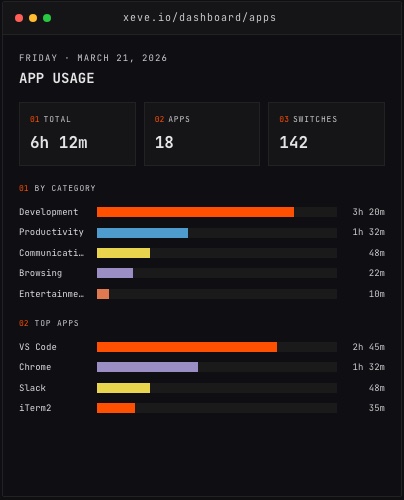 The App Usage dashboard from demo data, showing time by category and the top apps for a day.
The coding layer
App-level tracking sees that a code editor is open. It does not see whether you are writing, reading, debugging, or staring at a diff with the cursor blinking.
Coding-specific tracking solves this with heartbeats — small signals sent every time you interact with the editor: keystrokes, file saves, cursor moves. If no signal arrives for more than a few minutes, the session closes. The result is a lower number than app focus time and a more accurate one, because it counts active interaction rather than window focus.
Orma adds a VS Code extension and a Claude Code hook that both work this way. For other coding environments — Cursor, Xcode, iTerm2, Warp, Terminal — it uses window title detection on the app layer. Each session is broken down by project, language, and editor, so you can see where your coding time actually goes across the tools you use.
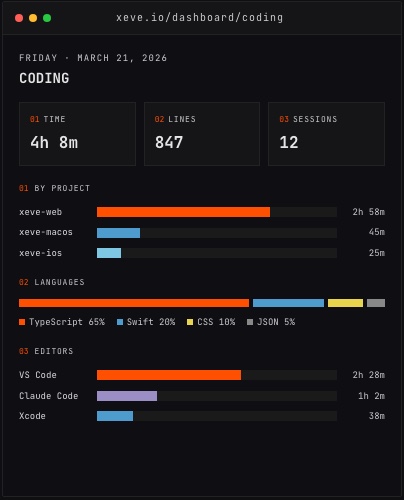 The Coding dashboard from demo data, showing a breakdown by project and editor.
External integrations
App and coding tracking cover what you do on your computer. No-code trackers can also pull from services that hold data the device app cannot see: GitHub activity, Spotify listening history, and health data from Bluetooth monitors and a phone.
Orma's GitHub integration pulls daily commits, merged pull requests, code reviews, and lines changed through OAuth. Spotify shows listening history. A Bluetooth heart rate sensor — Whoop, Polar, and others — streams heart rate over BLE while you work. The iOS companion app pulls steps, sleep, and active energy from HealthKit.
None of these require ongoing input. You connect a source once, and the data arrives continuously.
What you can do with the data
A shallow no-code tracker shows a summary: X hours in Development today. A deeper one computes relationships between the data streams, which is where most of the practical value lives.
Orma calculates Pearson correlations across 19 metric pairs — sleep versus coding output, heart rate during work versus focus time — and explains the results in plain language. A weekly AI digest analyzes app, coding, health, and GitHub data together and surfaces patterns. The web dashboard spans 24+ pages covering everything from a timeline of your day to a breakdown of your GitHub week.
The goal is not to optimize every minute. It is to have an accurate record of how your time actually breaks down, rather than a self-reported approximation. Most developers who look at their data for the first time are surprised by the ratio of communication time to focused work, or by how short their coding sessions actually run. The data does not change the day that already happened, but it makes the pattern visible — and visible patterns are easier to act on than vague impressions.
What to look for
If you are comparing no-code time trackers, the questions worth asking are:
Does it cover both app time and coding heartbeats, or only one? Does it read window titles inside browsers? Can you edit category mappings? Does it work on the platforms you actually use? And does it connect to the data you already generate — GitHub, your phone, your health devices — rather than only the activity that happens inside the tracker?
A tracker that only answers "what apps did I use" is useful. One that also answers "how did my sleep last week connect to my coding output" is a different kind of tool, and whether you want that depends on what you are trying to learn about your own day.
You can try Orma at orma.xeve.io. It is free during early access.