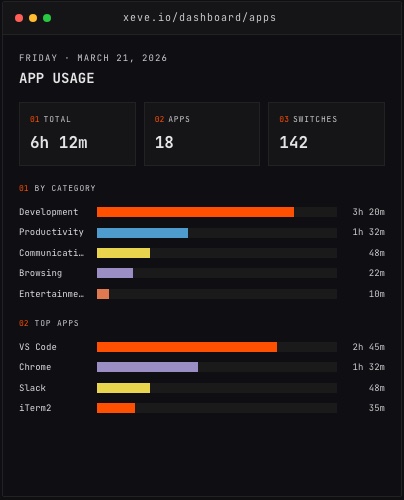
The tracker was running. The menu bar icon was present. No errors, no alerts, no logs. The dashboard just had no data for the day. That is what triggered a message to Claude Code on the morning of 22 August 2026:
no data has been updated so far in my dashboard for today can u check what broke
The investigation found a bug that had been in the Mac tracker since it was first written. It was not subtle, and it was straightforward to fix — once someone looked.
The sync queue and its hidden assumption
The Orma Mac tracker records every app switch and window title change, and the time spent in each. It buffers those sessions in a queue and flushes them to the backend every 60 seconds, merging consecutive sessions with the same app and category when the gap between them is short. The design is deliberately simple: collect, queue, flush.
The sync loop tracked whether an upload was in flight with a boolean flag, isSyncing. Each timer tick checked the flag before starting:
guard !state.isSyncing else { return }
state.isSyncing = true
// ... upload ...
state.isSyncing = false
This works as long as every upload finishes. If an upload hangs — the connection stays open, neither completing nor returning an error — isSyncing stays true and every subsequent tick bails at the guard. The queue grows. Nothing drains. The app keeps running, recording new sessions it cannot deliver, while the ones already waiting go nowhere.
There is no throw, so lastError stays nil. Nothing changes on screen.
What actually happened
The tracker had stopped writing at 21:32 IST on 21 August 2026. By the time the empty dashboard surfaced the following morning, 30 hours had passed and 1,389 sessions were queued behind a single hung upload. (Both figures are from PR #134, which documents the investigation.)
The machine had been in continuous use the whole time. Heart rate data from the Bluetooth monitor had kept arriving — it used a different code path and was unaffected. Replaying the tracker's own stored token against the API by hand returned 201 on the exact row it was failing to insert. The server was fine. Authentication was fine. Only SyncManager was stuck.
updateDeviceLastSeen() ran inside the same block as the upload, so even the device's last-seen timestamp had frozen at 21:32. A process consuming no CPU, showing no error, that looked exactly like a machine whose owner had stepped away.
The fix
PR #134 made three changes. The commit message describes each as non-optional.
The guard became a timestamp, not a flag. Instead of a boolean that only the upload could clear, isSyncing is now the moment the upload started. A later tick can see how long the current sync has been running. The latch still holds until the upload resolves, but the timer can now detect a stall.
A 45-second timeout was added. The Supabase SDK builds its own URLSession and does not expose a request timeout, so the fix races the call: if the upload has not returned within 45 seconds — shorter than the 60-second sync interval — it is cancelled, the batch is re-queued, and lastError is set. The menu bar changes color.
A 180-second stall deadline acts as a backstop if the timeout itself fails to fire. It clears the latch and skips the tick rather than launching a second upload beside one still in flight. Two uploads of the same batch collide on the deduplication index and reject the whole insert rather than just the duplicate row — a second upload would have made things worse, not better.
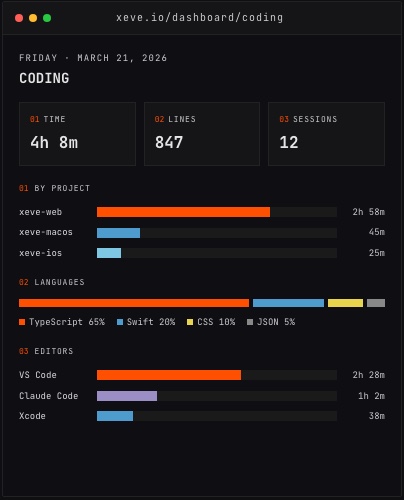
The Coding dashboard, showing coding time by project, language and editor.
The queue moved to disk
The fourth change had the most lasting effect: the session queue was made persistent.
Before the fix, the only known recovery was restarting the app — which destroyed every session waiting in memory. Sessions tracked during the stall were gone. After PR #134, SessionQueue writes to ~/Library/Application Support/xeve/pending-sessions.json. A batch stays in the file until the server confirms it received the data. A crash or restart mid-upload replays the batch on the next launch rather than losing it.
The queue's durability guarantee has an exact sequencing: a batch is written to disk before takeBatch() returns, and removed only when commit() is called after a confirmed upload. Getting that order wrong loses sessions at crash boundaries in exactly the scenario the feature exists to protect against.
Sixteen new tests cover the timeout path, the stall deadline, the write-before-drain sequencing, and the replay behavior when a batch is re-sent after a previous failure. That brought the Mac tracker test count to 78.
What the menu bar shows now
Before the fix, the menu bar status showed a session count and nothing about sync health. After it, the status line reads "N pending · synced Xh ago" and turns orange past three missed sync cycles.
That orange state is what would have appeared during the 30-hour stall: a pending count climbing, a timestamp that had stopped moving. The fix did not just resolve the specific bug; it made the entire class of bug visible without anyone having to notice an empty dashboard first.
What the prompt got right
The discovery prompt named the symptom, not a cause. "No data has been updated so far in my dashboard for today" left the investigation open to any explanation: a broken API, a missing token, a frontend render failure, a tracker that had silently exited, or something the investigation had not yet imagined. Working through those in order is how it landed on a flag that only the upload could clear.
A prompt that assumed a cause — "check if the API is down" — would have closed off the actual problem on the first check. Specific about the observation, open about the mechanism, is a good shape for a debugging prompt.
Using your own tool
Orma tracks your time without timers. When it works, you do not think about it. When it stops, the dashboard goes quiet — and a quiet dashboard, as it turned out, is its own diagnostic signal.
The tracker now recovers from stalls on its own. If a sync stops moving, the next cycle clears it. Nothing is lost to a restart.
Try orma.xeve.io. It is free during early access.