Gob, the pet that lives in Gobbl's notch, isn't made with an animation tool. There are no animation files and no pre-drawn frames: every frame is drawn in Swift, with SwiftUI's Canvas, from two inputs, Gob's mood and the time. We planned to use a proper animation tool, built a stand-in in code so the rest of the app had something to show, and the stand-in turned out to be the right answer.
The plan was to find a tool
One of the first prompts in the project asked for exactly that:
go ahead, build clip capture and claude code link and everything else also, i think there are a lot of tools with ai etc that will help us build the actual character / mascot look into it do some research gobbl sounds like a good name we can keep it
The research pointed at a vector animation tool with a runtime for Apple platforms. To keep going in the meantime, we wrote a view that draws the character in code, with a comment at the top saying it was a stand-in and that swapping the renderer later wouldn't change anything that uses it. That comment is still there.
The swap never happened, because drawing in code kept winning. Gob reacts to things an animation file can't know about ahead of time: where your pointer is, how fast you're typing, how loud your voice is while you dictate. In code, all of that is just another number in the drawing function.
One painter, three computers
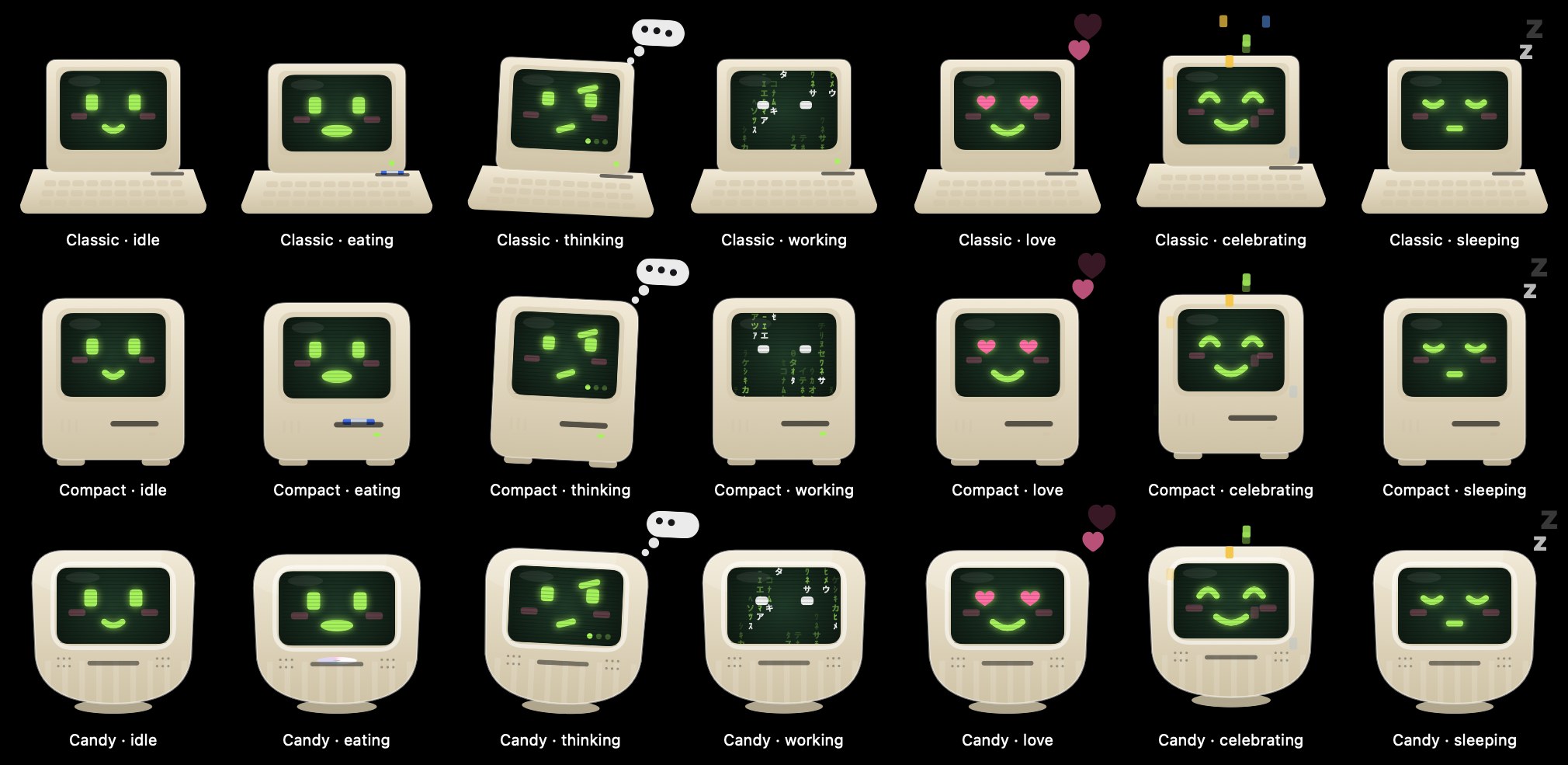
Gob started as a blob, then became a little retro computer whose face is drawn on its screen. It comes in three models, each from a different era: Classic is a late-70s home computer with a keyboard base, Compact is a mid-80s all-in-one with a floppy slot, and Candy is a late-90s bubble computer.
All three share one painter. Each model draws its own casing and returns where its screen is, and from there everything else is shared: the face, the moods, the hats and the effects on the screen. That's why a new mood only has to be written once, and why the eleven hats fit every model.
The screen itself is a small scene of its own. It's dark green glass with a radial glow, faint scan lines, and a soft reflection in the top corner. At notch size, some of that is skipped because it wouldn't be visible anyway.
Seventeen moods, and who decides
Gob has 17 moods. Twelve are what you'd expect from a pet: idle, curious, happy, love, eating, burping, dancing, sleepy, sleeping, alert, celebrating and dizzy. Five came from what Gobbl does on a Mac: working and thinking while an AI coding agent runs, typing while you type, listening while you dictate, and sweaty when the processor is maxed out.
The rules for picking one live in a small state machine, MascotBrain. It has an explicit clock, so its tests can move time forward instead of waiting. There are two kinds of input.
Events cause short reactions. Dropping files on the shelf makes Gob eat for a moment, dragging one out makes it burp, and petting it shows hearts. When a coding agent finishes, Gob celebrates. When the agent needs your permission, Gob looks alert for a few seconds.
Conditions set the mood Gob rests in. The order is fixed: a live reaction first, then dictation, then Gobbl's own AI writing, then a coding agent working or thinking. After that come sleeping (after ten minutes without input), dancing while music plays, sweaty when the processor is hot, sleepy when the battery is low and not charging, and curious when the pointer is near. Otherwise Gob is idle.
Gob never dies and never nags. Being ignored only makes it fall asleep. A quiet mode turns off the playful reactions but still shows the things you did yourself.
The screen does the acting
Most moods change the eyes, the mouth and a little squash or tilt of the body. The ones that tell you something about your Mac use the whole screen.
When a coding agent is working, the screen fills with columns of falling characters, bright at the head and fading behind, and Gob's eyes flick from side to side as if reading. When the agent is thinking, Gob looks up and to the side, raises one eyebrow, and three dots take turns lighting up in the corner. They're big enough to read even at notch size.
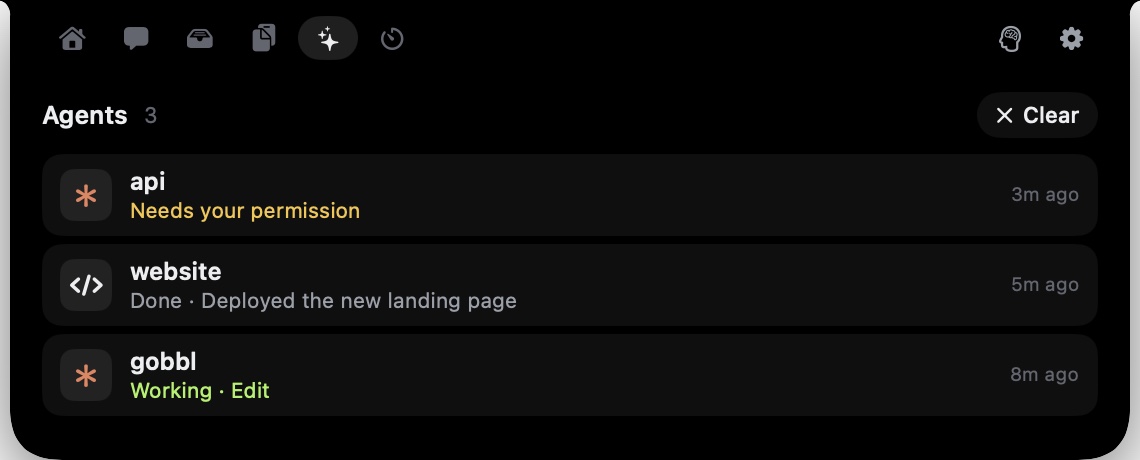 The Agents tab. Gob's mood follows the sessions listed here.
Typing took two tries. At first Gob just hopped with every key press, which you could barely see in the notch. Then this prompt came in:
instead of just jumping around , can we make random characters in the monitor along with the jumping so its visibl when the uer is typing ?
Now each press adds one made-up character to the screen, under a blinking cursor. The characters are chosen from the press count, not from your keys, because Gobbl never knows which key you pressed. The screen holds a few lines and scrolls, and after a pause it starts fresh. At tiny sizes the characters become blocks, since letters that small only look like noise.
Dictation swaps the mouth for bars that follow your microphone level. They're taller in the middle, and each bar wobbles at its own rate so the waveform doesn't look mechanical.
Eyes, blinks, and staying cheap
A pet in the notch is on screen all day, so its cost matters more than almost anything else about it. Redrawing constantly for a character that is mostly sitting still would waste energy for nothing.
So Gob chooses how often to redraw. Resting in the collapsed notch, it redraws only when a blink starts and ends, and nothing in between. When something is happening, it draws continuous frames. Even then, the tiny collapsed-notch version uses a lower frame rate than the big one, because at that size the difference can't be seen. Asleep, it doesn't redraw at all.
The eyes follow your pointer by moving the pupils a little towards it. That's why the redraw schedule also watches the pointer: moving the mouse wakes Gob's eyes up even while it rests. If the Mac is set to reduce motion, the resting moods stay still.
Computers don't hatch
The first version of Gob arrived the way game pets do, out of an egg. Once it was a computer, that stopped making sense:
I think instead of hatching we need to add something else since computer don’t hatch
So Gob arrives in a cardboard box. The box wobbles and opens, the computer rises out, and the screen switches on the way an old CRT does: a dot stretches into a line, the line opens into a white flash, the flash settles into green with "Hi!", and then the face fades in.
 The unboxing, frame by frame, from the closed box to Gob out and smiling.
Every step is drawn by the same painter, driven by one number that runs from 0 to 1. That also made it easy to check: the app has a debug mode that renders any moment of the animation to an image, which is how the frames above were made.
What we took away
Draw a character in code when it has to react to the live state of the computer. A tool made for designed animation is excellent at motion you can plan ahead of time. Gob's best moments come from things nobody can plan: your typing, your voice, an agent finishing its work. Drawing it in code made each of those one more input to a function, and made it easy to control how much the pet costs to keep on screen.
Gobbl is free and open source for macOS 14 and later. Meet Gob at gobbl.xeve.io.