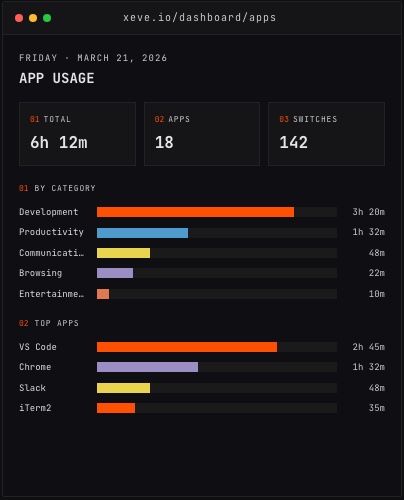
You finish the day and someone asks how many hours you worked. If you tracked your time, you know. If you didn't, you guess. Automatic app tracking means you always have the answer, with nothing to start or stop.
This is the case for Orma, a Mac and Windows tracker that runs in the menu bar and records every app switch in the background. The App Usage dashboard shows your total active time for the day, broken down by category, with no manual input required.
Why you're probably guessing
Remote workers and independent developers tend to have a skewed sense of how long they worked. When you're the only person who knows your hours, there's no external check. You feel busy, you were at your desk all day, so you assume you put in a full day. Sometimes you did. Sometimes the day was half focus work and half Reddit.
The problem isn't intention — it's that the brain is not a good time-keeper. It conflates "time I was awake and near a computer" with "time I was actually working." Every developer who has sat down at 9am and looked up to find it's already 2pm and they've written forty lines of code knows this feeling. The hours pass; the output doesn't always match.
Starting a timer every time you switch tasks is supposed to fix this. It rarely does. The overhead is exactly high enough that you skip it on busy days, which are the days you most need the data.
How automatic tracking captures your hours
Orma runs as a menu bar app on macOS 14 and later. It asks for one permission — Accessibility access in System Settings — and then records which application has focus, and for how long. It detects the frontmost app every second.
When you switch from your editor to Slack, it notes the transition. When you open a browser tab and spend twenty minutes reading, that shows up. When the screen locks or you close the lid, idle time is excluded. What remains is a log of every active minute at your Mac.
At the end of the day — or in the middle of it — you open the web dashboard at orma.xeve.io and see the total. It's a single number: the aggregate of every minute you spent in an active app that day.
What counts as work?
Total active time is not the same as total work time. Orma's category system separates them.
Apps are bucketed automatically into nine categories: Development, Productivity, Communication, Browsing, Entertainment, Design, Writing, System, and Uncategorized. For most people, work time is the sum of Development, Productivity, and Communication. Entertainment is Spotify, YouTube, or a game. Browsing is everything else on the web.
This is where the honest picture comes in. If your total active time was seven hours but two of them were in the Entertainment category, you worked five hours. That may still be a good day. It may not. The point is that you know, rather than assuming.
You can dig deeper by clicking any category. The top-apps list inside it shows which specific tools made up that slice. "Productivity" might mean Notion and Google Docs. "Communication" might mean Slack, email, and Zoom. The breakdown tells you what kind of work filled those hours, not just that work happened.
Coding time specifically
If you write code, there is a more precise layer under the category totals. Orma's VS Code extension and Claude Code hook track active coding by detecting keystrokes and file saves rather than just watching which app is in front. Passive time — a build running, reading a long function, waiting for tests — is distinguished from active coding.
The Coding dashboard shows this separately: time by project, by language, and by editor, with a session count.
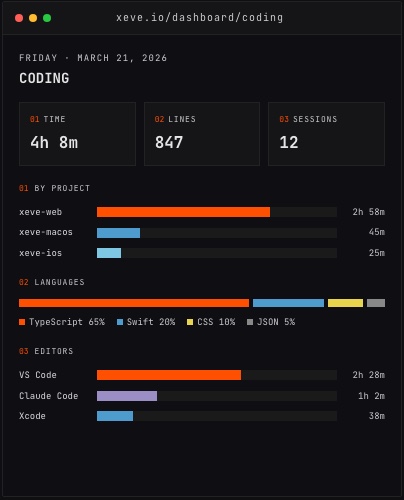 The Coding dashboard breaks coding time down by project and language, separate from total app time.
For a developer who wants two numbers — "how long was I at my Mac?" and "how long was I actually writing code?" — this gives both without any manual entry. The app-level total is honest about screen time. The coding dashboard is honest about the subset of that time spent on the thing developers are usually trying to protect.
The first week as a baseline
You cannot know whether a day was productive without context. The first week of data gives you a baseline — what your average looks like when you feel you've had a good day, and what it looks like when you haven't. After a few weeks, the dashboard's weekly view starts to show patterns.
Maybe you reliably hit focus windows between 9am and noon, and the afternoon shifts toward communication. Maybe your weekend hours look different from weekdays in ways you didn't expect. None of this requires any setup beyond letting the tracker run.
The weekly summary is one view inside the dashboard at orma.xeve.io, alongside the Coding view, a GitHub activity feed, a correlation engine that finds relationships across 19 metric pairs, and a weekly AI digest that puts all of it in words.
The simple version
If you want one number — how many hours you worked today — the App Usage dashboard gives it to you in the total at the top of the page. It is the sum of every minute Orma saw your Mac in an active state, excluding idle time and the lock screen.
For remote workers who wonder whether they worked enough, and for developers who want to understand how their time actually distributes across tasks, this is a starting point that requires exactly nothing to maintain. You install the app, you grant a permission, and then you stop thinking about it until you want the data.
Orma is free during early access at orma.xeve.io.