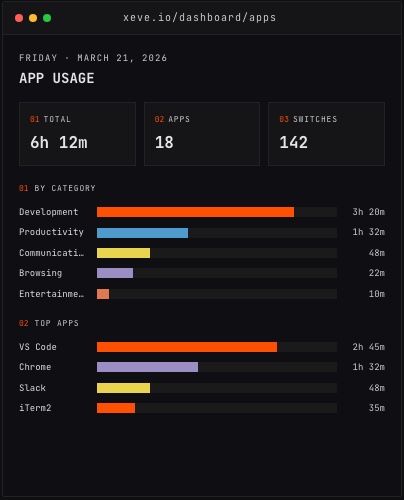
Automatic time tracking is precise about one thing: which application held the foreground, and for how long. Everything else — whether you were focused, whether the work was productive, how much of that VS Code session was writing versus reading a diff — depends on which layers the tool adds on top.
This distinction matters if you are deciding whether to trust a time tracker for work, billing, or self-knowledge. The short answer is that app-level tracking is accurate at what it measures. The longer answer is that "which app was open" and "what I was doing" are two different things, and a tool that tells you both is different from one that tells you only the first.
What app-level tracking actually captures
Every automatic time tracker starts at the operating system level. The OS keeps an exact record of which application is in the foreground and when. Reading that record is reliable — the OS is not estimating, it is reporting what happened. The result is a precise log of which app held focus and for how long.
Window titles extend this. When a browser is in the foreground, the window title shows the current tab's page title. A tracker that reads window titles can distinguish time in Figma from time on YouTube, even though both appear as Chrome in a plain process list. This is not estimation — the title is whatever the browser reports.
What app-level tracking cannot do is tell you what you were doing inside the app. VS Code open for four hours could mean four hours of active writing, an hour of reading documentation, two hours of a meeting in a different room with the laptop open, or some mix. That is not a flaw in the measurement. It is the edge of what passive foreground observation can reach.
The question "how accurate is this?" has to be asked relative to what you want to know. For "where did my attention land today?" — which apps, which categories, what proportions — app-level tracking is very accurate. For "was I productive during those hours?" it is an input, not an answer.
Why coding time needs its own approach
Coding is the case where the gap between "app was open" and "work happened" is widest. A developer who opens VS Code after lunch and closes it before the end of the day will show four or five hours in the Development category. That number covers writing code, reading documentation, waiting for a build, attending a standup with VS Code visible in the background, and staring at a problem before typing anything.
An editor extension closes that gap. Rather than reading the foreground window, it records activity inside the editor — when you are actively working in a project. The number it produces is lower than the app focus time, and it is measuring something different: the actual time spent in the editor on your projects, broken down by project and language.
Orma tracks coding time through a VS Code extension and a Claude Code hook, alongside app-level tracking on macOS and Windows. The coding dashboard shows time broken down by project and language, derived from editor activity rather than from which window was open.
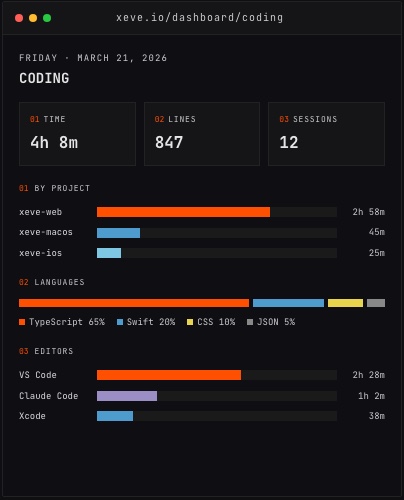 The Coding dashboard, with coding time by project and language from demo data.
Having both numbers in one place reveals something the individual numbers hide. Total Development time (from app tracking) alongside active coding time (from the editor extension) shows how your time inside the editor was actually spent. A large gap — Development time noticeably higher than coding time — often reflects code review, documentation reading, or terminal work that the editor extension does not count.
The limits that remain
App-level tracking runs continuously and is accurate for what it measures. What it cannot see:
Intent. Whether you were focused or idly browsing inside an app classed as Productivity is not visible from the foreground record alone.
Offline time. A meeting on a phone, working on paper, or time away from the keyboard does not appear in the app log at all.
Multiple devices. If you work across a laptop and a desktop, each tracker sees only its own machine unless the data is combined in a single dashboard.
These are not bugs to be fixed. They are the boundary of what software can observe without surveillance. A tracker that read your screen or logged keystrokes to infer intent would know more, at a different cost.
Accurate enough for what?
For understanding where your time goes at the category level — how much you code versus communicate versus browse — app-level tracking is specific and reliable. For tracking how long a particular project took across a week, app plus editor data together give a solid picture. For billing a client by the hour, automatic tracking is a cross-check and a memory aid; the responsibility for a billed number stays with the person signing the invoice.
The question most people are actually asking when they ask about accuracy is whether the numbers are worth looking at. They are. Automatic time tracking gives you a factual record of where your attention went, which is more than memory and self-report provide. That is what it promises, and it delivers it.
Orma is free during early access at orma.xeve.io.