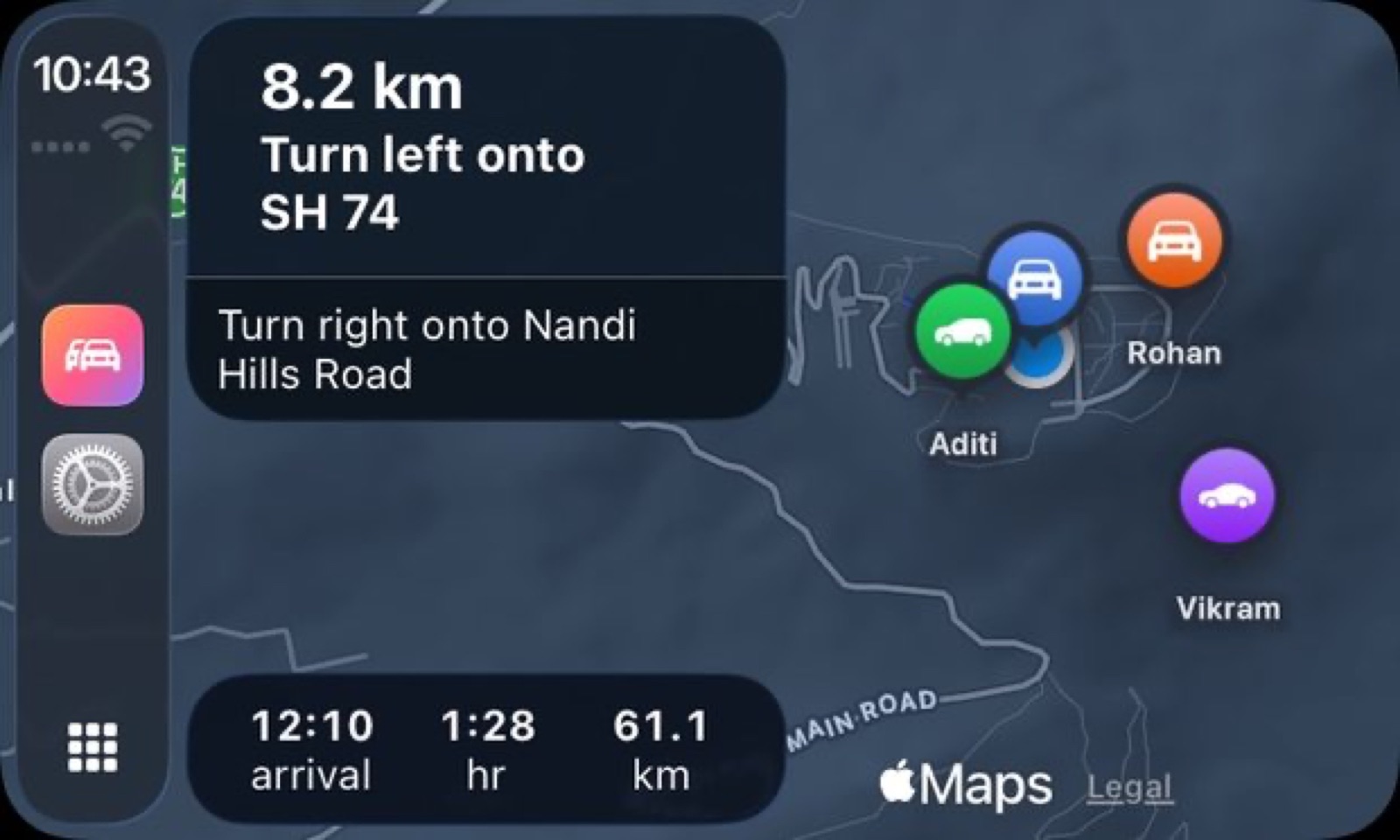
When you're driving in a convoy, two things compete for your attention: the navigation telling you where to turn and the group map showing whether anyone fell behind. DriveStream on CarPlay shows both at once.
The CarPlay integration puts the convoy map and turn-by-turn directions on your dashboard display together. You can see where the next turn is, who's ahead, who's behind, and how far the group has stretched — without reaching for your phone or glancing away from the road.
A shared destination, not separate ones
The feature that makes this work is shared destination. One person in the group sets the endpoint, and DriveStream sends it to every phone in the convoy. Everyone gets the same traffic-aware route and ETA at the same moment, rather than each driver independently typing the address into a separate map app and hoping for the same result.
For trips with multiple stops — a fuel station, lunch, a scenic detour, then the final destination — each stop goes into the shared itinerary and every car gets the updated plan automatically. When the lead driver adds a stop or changes the route, the rest of the group sees the change on their screen straight away.
DriveStream's guidance works alongside the shared plan: traffic-aware ETAs update as conditions change, and turn-by-turn directions are active on every phone, not just the navigator's.
What the CarPlay display shows
On the CarPlay screen, the convoy map is visible alongside the next turn. The app is described on the DriveStream site as "a full CarPlay app, not a phone app you glance at" — it's built for the dash display, not adapted from a phone layout. The convoy cars appear on the same map as your route, each showing its current speed and position.
The running order is clear on the map: you can see at a glance whether the car ahead has pulled away and whether the one behind is still close. All of this stays on the dash, so the phone can go in a pocket or a mount without needing to be watched.
Gap, speed, fuel on the phone
While CarPlay handles the map and navigation, the phone screen shows the convoy list: each car's gap to the car in front, its current speed, its fuel level and remaining range, and its phone battery. This is the view a passenger would study — it answers the question "how's everyone doing?" without a call or a text.
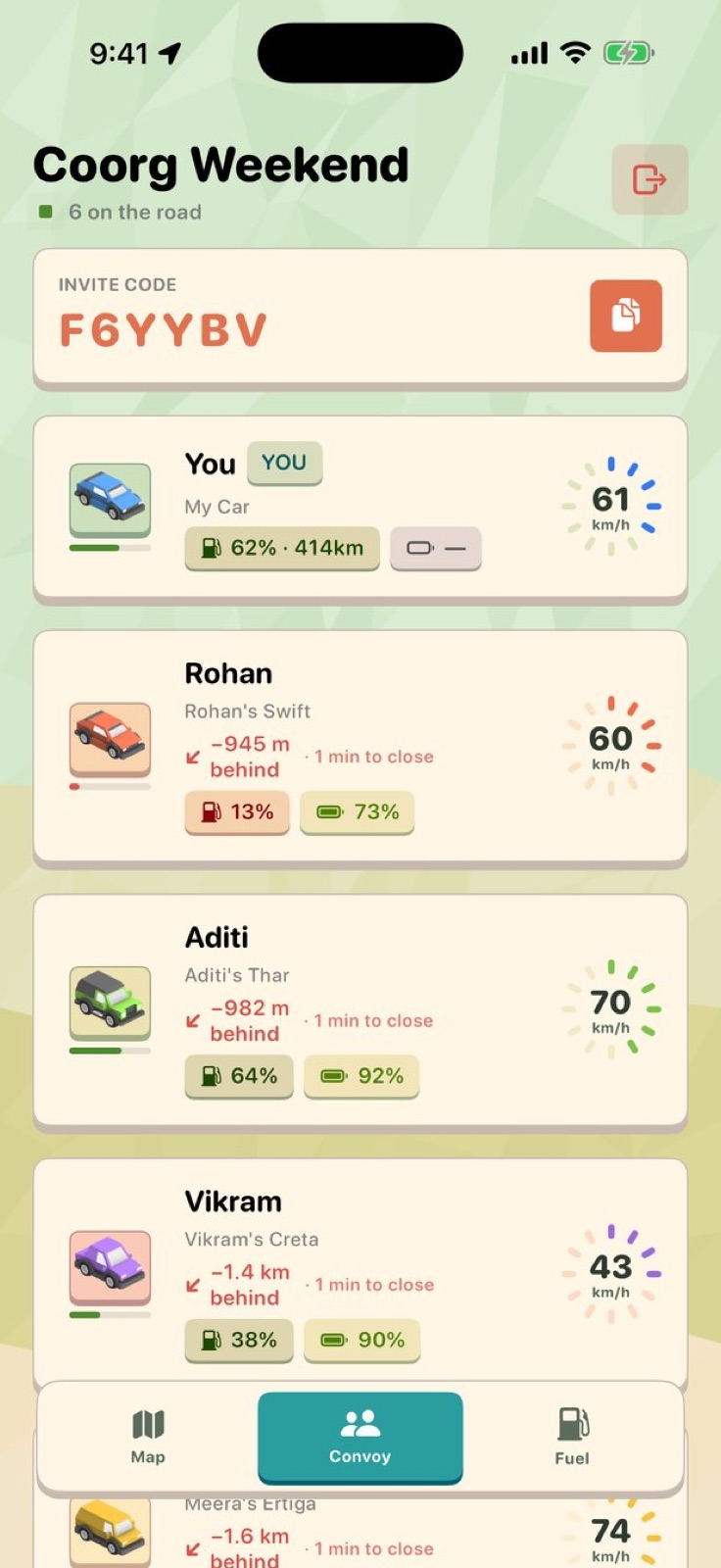 The convoy list: each car's gap, speed ring, fuel and phone battery.
The fuel figure is visible to the whole convoy. If someone's running low, the rest of the group knows before that driver has to announce it. It's the kind of information that prevents unplanned stops or, worse, a car pulling off without the others knowing why.
Press-to-talk stays in reach
When something does need saying — a turn coming up fast, a lane change, a spontaneous stop — the walkie-talkie works alongside the navigation and the map. Press, speak, release. The audio is live only, nothing is recorded or stored, and it doesn't cut across the navigation prompts.
For quick course corrections and convoy decisions, it's faster than trying to call each car in sequence.
Every drive is recorded
Whether you use CarPlay or not, every drive is logged automatically: the route recorded at 1 Hz, total distance, moving time separated from parked time, and top speed. After the trip there's a replay — an animated scrub through the whole route, with variable speed from 1× to 300×.
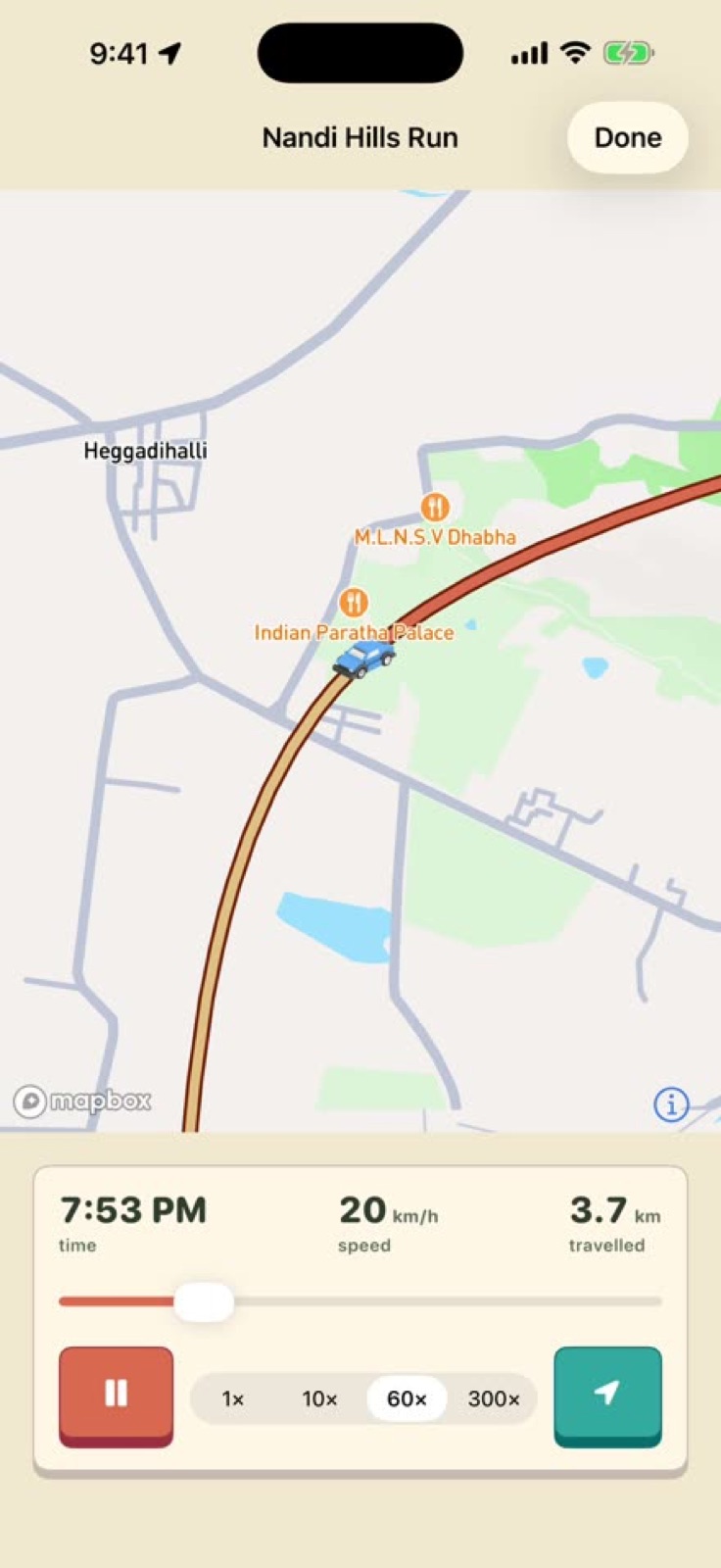 Animated replay after a drive, with a scrubber and adjustable playback speed up to 300×.
The summary is on the phone and in a web companion. For anyone in the convoy who joins late or takes a different segment, the record covers their own drive independently.
A rank for the distance you cover
DriveStream tracks cumulative distance and moves you through seven tiers. The full progression, as listed on the DriveStream site: Rookie, Commuter (100 km), Cruiser (500 km), Tourer (2,000 km), Road Warrior (5,000 km), Trailblazer (15,000 km) and Legend at 40,075 km — the circumference of the Earth. It's a record of how much road you've actually covered, not a gamified streak.
Privacy
DriveStream has no ads and no analytics library in the app. Location is shared only with the active convoy — nobody outside the group sees where you are. When the trip ends, the sharing stops. The app doesn't work without a data connection for live features, and there's no Android version.
It requires iOS 26 or later on iPhone, and it works with CarPlay on compatible head units.
Getting started
DriveStream is in beta for iPhone on iOS 26 or later. Everyone in the group runs the app, and the convoy map fills in as each car sets off. Details and the beta link are at drivestream.app.