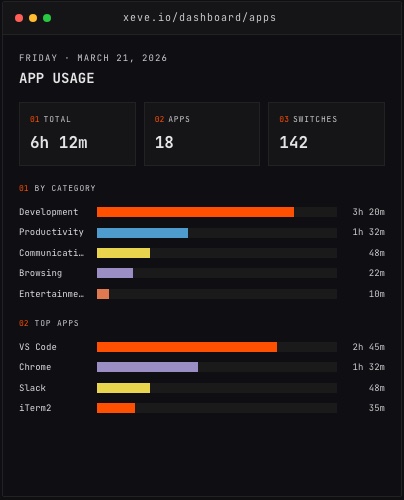
Automatic time tracking is more accurate than manual entry for most developers. Not because the software is smarter, but because manual entry requires you to remember things — and memory of your own working day is systematically partial.
The mechanics of manual time tracking
Manual time tracking tools ask you to start a timer when you begin a task and stop it when you switch. Most developers don't actually do this. Instead they log time retroactively: at the end of the day, or when an invoice is due.
What you remember is the big blocks — the multi-hour sprint, the pull request review, the feature you shipped. What you forget is the documentation you read before writing a line, the times you switched to Slack mid-thought, the debugging session that took longer than the fix itself. Manual tracking can only log what you remember, and what you remember tends to be the work you can name.
There's also a formatting pressure. A round-number label like "three hours of coding" is a natural manual entry. The actual sequence — reading documentation, writing the implementation, debugging a side issue that appeared along the way, then coming back and writing tests — never appears in a manual log, because breaking it down would interrupt the work.
None of this is dishonesty. It's a structural limitation of the format: the tool can only record what you tell it.
What automatic tracking actually captures
An automatic time tracker runs in the background and records which application is in the foreground and for how long. On macOS, this uses the Accessibility API to read the active app and window title, without reading document contents, logging keystrokes, or taking screenshots.
The raw data is a timeline: VS Code with a filename, then Terminal, then Chrome with a URL, then Slack, then VS Code again. The tracker groups these into categories — Development, Communication, Browsing — and accumulates totals by category and by app. Idle detection recognizes when you've stepped away from the keyboard, so that time isn't attributed to whatever was last in the foreground.
What this captures that manual tracking misses:
Context switches you don't consciously notice. Every alt-tab to look something up is in the record.
Browser activity broken down by site. Window titles identify which sites you visited, so "Browsing" isn't one opaque block.
The ratio between focused work and interruptions. On a day that felt productive, you can see whether that was extended focused time in your editor or short bursts surrounded by context switching.
The gap between what you felt you did and what actually happened. The automatic record rarely matches what you'd have written down manually, and the difference is usually the most informative part.
Where manual tracking still makes sense
Automatic tracking doesn't replace every use case.
Client billing by project code. If you need to attribute hours to specific project codes for invoicing, a manual entry with the project code attached is cleaner to reconcile with an invoice than inferring the project from which files were open in VS Code. Some developers run both: automatic tracking for their own understanding, manual entries for what goes on the bill.
Work that doesn't happen at the keyboard. Thinking through a problem on a walk, reviewing printed specs, or working through a design on paper won't appear in any automatic tracker. Manual entries capture those. Automatic tracking can only see what happens on screen.
When intent matters more than duration. If the outcome you care about is "what did I actually accomplish today" rather than "how long was I in each app," a deliberate description in a manual entry carries more information than a window title log.
Why developers specifically benefit from automatic tracking
Developer work is highly fragmented at the activity level, even when it's focused at the goal level. Building a feature might involve reading documentation, writing the implementation, debugging a side issue, and then coming back to write tests — these phases blend into each other in a way that makes manual tagging impractical without interrupting the work itself.
Automatic tracking captures this without asking you to stop. It also captures the parts of development work that developers tend to undervalue in retrospect: the reading, the research, the debugging that produced no visible output. Over time, this builds a more accurate picture of where programming time actually goes versus where you assume it went.
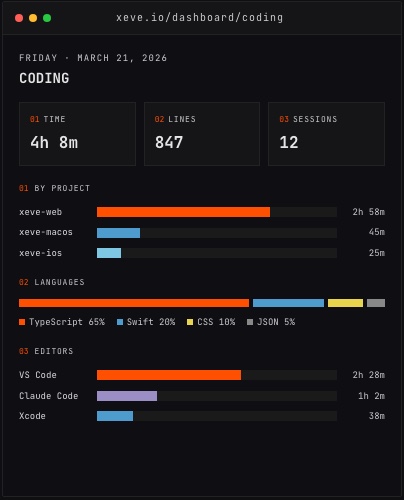 The Coding dashboard in Orma, showing time by project, language, and editor.
The other advantage for developers is integration with the rest of their data. Coding hours alone are a partial view of a work day. Combining them with app usage, GitHub commits, and health data opens up questions like: does the time I spend in meetings correlate with fewer commits the next day? That kind of question can't be answered by a manual timer.
What automatic tracking doesn't capture
Automatic tracking records the app and window title, not the contents. It doesn't read documents, emails, or code. It doesn't log keystrokes or take screenshots. The data it produces is a record of where your attention went — not what you were doing while you were there.
This is both a limitation and a feature. The limitation: you lose the context of what you were actually doing inside a given app. The feature: the data is minimally invasive, doesn't create a surveillance record of your screen, and doesn't require trusting the tracking tool with the content of your work.
Automatic trackers also can't attribute time to work that happened away from the computer. A developer who does their best architectural thinking on a walk will look less productive on paper than one who does the same thinking at the keyboard. That bias is worth knowing about when reading your own data.
The practical answer
For understanding your own productivity patterns as a developer — seeing where time actually goes, finding where it disappears, correlating your output with other variables — automatic tracking is more accurate than memory. It captures what you actually did.
For billing clients or tagging time by project code, manual entry is easier to reconcile with an invoice.
The two approaches solve different problems. A developer trying to understand their day benefits from automatic tracking. A developer billing by the hour benefits from some manual annotation on top of it. The gap between the two records is where the interesting data usually lives.
Orma tracks app usage and coding sessions automatically on macOS and Windows — with GitHub activity, Spotify history, and iOS health data alongside a correlation engine covering 19 metric pairs. It's free during early access.