An automated time tracker records which app you use and for how long, without any timers or manual entries. Orma does that — and also pulls coding activity from your editor, GitHub commits and pull requests, Spotify listening history, and heart rate from Bluetooth sensors, so your whole day lands in one dashboard.
Every automated time tracker starts at the operating system level. Orma detects which app is in the foreground every second and reads the window title to tell websites apart inside a browser. Each session is sorted into one of nine categories: Development, Productivity, Communication, Browsing, Entertainment, Design, Writing, System, or Uncategorized.
The result is a full record of your day — not self-reported, not estimated. You see exactly how long each app held your attention, grouped into categories so you can see the ratio of focused work to communication at a glance.
Orma runs this on macOS 14 and later and on Windows 10/11. Most time trackers are macOS-only, so if you work across both platforms, you get gaps. Orma fills both without any configuration change on the Windows side.
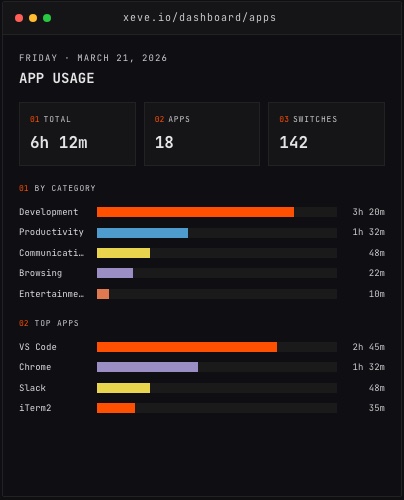
The App Usage dashboard, showing category totals and top apps from a day of demo data.
App-level tracking cannot tell you whether you were typing in VS Code or staring at a diff. Knowing you had VS Code open for four hours is not the same as knowing you wrote code for four hours.
Orma adds a VS Code extension and a Claude Code hook, both of which send heartbeats only when you are actively interacting with the editor — keystrokes, file saves, cursor movements. When you stop for more than a few minutes, the session closes. This is the same approach WakaTime uses, and it produces a much lower number than app-level tracking does, because it is counting different things: active writing, not window focus.
The coding dashboard breaks session time down by project, language, and editor. If you work on a TypeScript frontend in the morning and run Python scripts in the afternoon, those are recorded separately. You can see which project got your actual attention that day, not just which editor was on screen.
Coding time measures input. GitHub data measures output.
Orma connects to GitHub via OAuth and pulls commits, merged pull requests, code reviews, and lines changed daily. This gives you the other side of the picture: not just "I was in VS Code for four hours" but "I was in VS Code for four hours, shipped two pull requests, and reviewed three more."
A day with high coding time and low commit count looks different from a day with high coding time and high commit count. Seeing both numbers together makes that difference concrete — it is the kind of pattern that is obvious once you see it and invisible until you measure it.
Orma also pulls Spotify listening history via OAuth and records heart rate from Bluetooth Low Energy monitors — Whoop, Polar, and other standard BLE devices — on macOS and through the iPhone companion app. The iPhone companion adds HealthKit data: steps, sleep duration, and active energy.
These data streams are not productivity metrics in the traditional sense. But they are inputs to your productivity. Sleep, steps, and focus time often move together, and the relationship is personal — your patterns are not the same as anyone else's. Collecting the data is how you find out what yours actually look like.
Collecting multiple data streams in one place lets you compare them. Orma computes 19 metric pairs automatically using Pearson correlation and writes each result in plain English, so you do not need to interpret a coefficient yourself.
The 19 pairs span all of the data layers: sleep against coding time, steps against focus time, Spotify sessions against time of day, GitHub activity against the previous night's rest. You do not pick which pairs to examine; Orma computes them all and surfaces the ones that are statistically meaningful in your data.
This is where the difference between an app-level tracker and a full-stack tracker becomes concrete. An app-level tracker tells you you spent 3.5 hours in VS Code. Orma can tell you your VS Code sessions are consistently longer on days your health data looks a certain way — not because a study found that pattern in aggregate data, but because Orma found it in yours.
The 19 correlations are not all going to be significant for everyone. Some will be flat lines. A few will surprise you. The value is not the list of pairs; it is knowing which patterns are real in your own data rather than assuming the averages apply to you.
The macOS and Windows trackers install and run in the background with no setup beyond logging in. The VS Code extension installs in one click from the extension marketplace. The Claude Code hook installs with a single terminal command and starts sending heartbeats immediately.
The GitHub and Spotify connections are OAuth flows that take about a minute each. The Bluetooth heart rate tracking starts as soon as your device is in range; there is no pairing step beyond the standard BLE connection.
Orma is free during early access, with no credit card and no usage limits. Early users keep free access when paid plans launch. If you want to see what your own patterns look like across all of these layers, the installers and extensions are at orma.xeve.io.