An automated time tracker runs in the background and records how you actually spend your day — no timers to start, no projects to tag, no discipline required. If you have tried manual tracking with Toggl or Clockify and abandoned it within a week, the problem was not your commitment; it was the tool's design.
Manual tools ask you to do two things at once: work, and record that you are working. That is a reasonable ask for billing purposes — a lawyer needs to know which client's time to charge — but it is a poor fit for a developer who context-switches between an editor, a browser, a terminal, and a chat tool many times a day.
The friction compounds quickly. Forget to start a timer once and that session's data is gone. Tag a session with the wrong project and your totals mislead you. Take a break without stopping the timer and your "deep work" hours are inflated. Manual tracking produces data that reflects your attention to tracking more than your actual work patterns. Automated tracking sidesteps this entirely by watching what you do rather than asking you to report it.
A genuine automated time tracker operates at the operating system level. On macOS, it listens to app-switch events from the system. On Windows, it watches the foreground window. Every switch is logged — the app name, the window title, a timestamp — without any action on your part.
Window titles are the detail that separates useful data from noise. Knowing you spent time in Chrome is not actionable. Knowing you spent time on a specific GitHub pull request or a particular Notion document is. Window title parsing turns raw app data into real context.
Categories group apps automatically: Development, Productivity, Communication, Browsing, Design, and more. You can adjust the mapping for your own workflow, but the defaults are sensible for most developers from day one.
App-level tracking has a blind spot: it counts VS Code time, not VS Code coding time. An IDE sitting in the foreground while you stare at a bug, wait for a build, or read documentation registers as "coding." For accurate active coding time, you need something closer to the editor.
Heartbeat-based tracking solves this. An extension inside VS Code emits a signal only when you are actively interacting with the editor — typing, moving a cursor, saving a file. When activity stops, the heartbeat stops. The result is a figure that reflects actual writing time, not window-open time.
This is how WakaTime works. It is also how Orma's VS Code extension works, with one addition: a Claude Code hook that extends the same tracking to AI-assisted sessions in the terminal. Orma combines heartbeat data from your editor with system-level app data, so you see active coding time alongside everything else — in one place, without stitching two dashboards together.
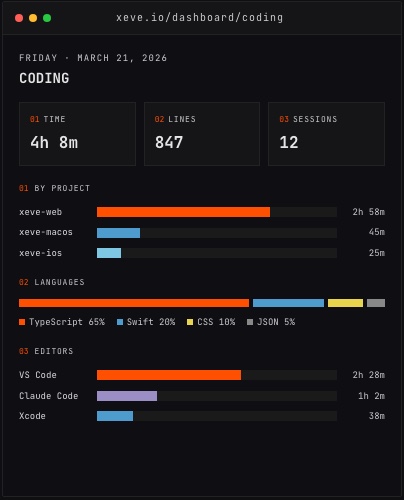 *The Coding dashboard, shown with demo data.*Most developers' time does not stop at the IDE. Orma also pulls data from the other places your day actually goes:
This matters because the relationship between sleep and next-day coding output, or between resting heart rate and hours in the terminal, is something you can now measure rather than guess at. Orma auto-computes 19 correlations between your metrics and surfaces the ones that are actually connected. A weekly AI digest then summarizes the patterns in plain text — what changed this week compared to your baseline, and what might be worth adjusting.
The web dashboard has 24+ pages, but the most useful ones are the simplest: where your time went today, which hours were your most focused, how much of your work was deep versus reactive.
Once you have a few weeks of data, patterns become clear without effort. You will know which days you actually code versus which days get consumed by meetings and communication. You will know whether your real peak hours are early morning or late afternoon. These are not insights you can generate by introspection alone — they require data, and consistent data requires automation.
CSV and JSON export are available if you want to run your own analysis. There is also a public API with OAuth scopes and a remote MCP server, so AI tools can query your data with your permission — useful if you want to ask questions about your patterns in a conversation rather than a dashboard.
Orma is built for developers and quantified-self people who want to understand where their time goes. It is not a billing tool. There is no client tracking, no invoicing, no approval workflow — only your own data, organized so you can actually read it.
The macOS and Windows apps run as native menu bar apps. Orma lists its tracker at under 0.1% CPU and under 30 MB of memory, so it does not compete with the tools it monitors. The iPhone companion adds HealthKit, location check-ins, and home screen widgets. Team and organization dashboards are available for shared visibility into how a group actually spends its engineering time.
Orma (formerly xeve) is free during early access. If you have been putting off time tracking because every tool you tried required too much manual effort, the place to start is orma.xeve.io.